HOME

Thursday, November 29, 2012

Google's Horowitz: Facebook is social network of the past

NEW YORK--Facebook is the social network of the past, and the way it implements advertising doesn't really work, a Google executive overseeing the search giant's social-networking product said today.
Bradley Horowitz, the Google vice president of product for Google+, said Facebook isn't set up in a way that's compatible with the real world. People should be able to have a conversation with a certain group of friends without involving others. And they should be able to have real conversations, he said, not 140-character blurbs like Twitter.
"In designing Google+, we keep thinking about the real world, the way people actually are," Horowitz said today during a Business Insider conference in New York. "We're trying to make a product that's ergonomic for the way our attention is wired."
Meanwhile, Horowitz compared the ads in a Facebook user's newsfeed to a sandwich board. Such ads don't really have any context and often aren't very effective, he said.
"Jamming ads and agendas into user streams is pissing off users and frustrating brands too," he said. "That's not the way the world works."

Wednesday, November 28, 2012

10 reasons to choose Ubuntu 12.10 over Windows 8


Microsoft's Windows 8 dominated countless headlines in the weeks leading up to its launch late last month, but October saw the debut of another major operating system as well.
Canonical's Ubuntu 12.10 "Quantal Quetzal" arrived a week ahead of its competitor, in fact, accompanied by a challenge: "Avoid the pain of Windows 8." That slogan appeared on the Ubuntu home page for the first few hours after the OS's official launch, and attracted considerable attention.
Apparently Canonical decided to tone down its message later in the day—the slogan now reads "Your wish is our command"—but it seems fair to say that the underlying challenge remains.


Ubuntu comes with a variety of software packages, including Firefox, Thunderbird, and the full-featured productivity suite LibreOffice.

Window of opportunity

Ubuntu is a widely popular open-source Linux distribution with eight years of maturity under its belt, and more than 20 million users. Of the roughly 5 percent of desktop OSs accounted for by Linux, at least one survey suggests that about half are Ubuntu. (Windows, meanwhile, accounts for about 84 percent.)
The timing of this latest Ubuntu release couldn't be better for Windows users faced with the paradigm-busting Windows 8 and the big decision of whether to take the plunge.
Initial uptake of Windows 8 has been unenthusiastic, according to reports, and a full 80 percent of businesses will never adopt it, Gartner predicts. As a result, Microsoft's big gamble may be desktop Linux's big opportunity.
So, now that Canonical has thrown down the gauntlet, let's take a closer look at Ubuntu 12.10 to see how it compares with Windows 8 from a business user's perspective.


Perhaps the biggest surprise for many users of Windows 8's mobile-style Modern UI is that it has no Start button.

Tuesday, November 27, 2012

How to spot fake user reviews while shopping online

It's Cyber Monday, and while you're busy shopping online, chances are you'll see lots of user reviews on various products. While the majority of those reviews do come from real users like yourself, who are passionate enough to share their opinions on a product, many of them could be fake, left by the vendors themselves to either promote their product or, in many cases, smear competitors.

While it's exceedingly difficult to absolutely prove that a review is faked, here are a few tips on spotting those that aren't from real users. These will come in handy -- not just today, but whenever you go shopping online.

Absolute singing of praises with no downsides; or a total dismissal of any good qualities

When was the last time you approved of a product unquestioningly without any negatives? No matter how good an item might be, chances are it also has one or two shortcomings, however minor. That said, a five-star review with unqualified compliments, such as "perfect" or "absolutely the best," that offers no downside to balance those opinions, is very likely a plant.
Conversely, chances are also good that a review that dismisses a product in absolute terms is from either a competitor or a fanboy of another brand.

Reviewers' names

Reviewers' names are also telling in determining whether a review is legit. Generally, fake reviewers don't take the time to create real names and tend to go with variations of another screen name, or choose meaningless random names, such as beatsjam1234, pfb6736, nb32003, and so forth.

Review dates

The date of the review offers lots of information about how genuine it is. If you have a number of five-star reviews on the same product, posted on or around the same date and written in a similar tone, chances are they are counterfeit. Also, if a user review professing extensive hands-on experience is published on the release date of a product or shortly after, it's also likely a ruse. It takes a long time for a typical end-user to compile real-life experience with a product. Typical of this are the user reviews on the iPhone 5, which were left days before the phone even came out.

A single review per account

Generally, you have to create a user account to write a review. If you see an account that has posted just one single review for a particular product, or reviews only products from a single vendor, it's highly likely that it's a fake review. In this case, the date the account was created and the date of the review are also very telling, especially when they are the same.

The tone of the review

The tone of the review is probably the most telling factor when assessing how real a review is. If you spot a review that reads like a press release or a commercial, offering information about features and extolling how superior the product is when compared with its competition, that review is most likely planted by the vendor.
That said, I am getting weary of both five-star and one-star user reviews. Reviews with ratings that fall in between are generally more legitimate and useful. Also note that real users talk more about reliability, performance, and overall value, and they are almost never happy about high costs.

SOURCE

Monday, June 14, 2010

Access Internet Using Calculator

1. Open calculator in windows as usual, than choose Help --> Help Topics.
2.Then press question mark (?) at top left part of the Title Bar choose Jum to URL
3. Put any website address that you want to access, and happy browsing from your calculator.

Saturday, January 30, 2010

iPhone Hacker Says He's also Cracked PlayStation 3

The 20-year-old hacker best known for cracking Apple's iPhone says he's done it again, this time with Sony's PlayStation 3.

In a Friday blog post, George Hotz said that after a five-week effort, he'd finally managed to run his own software on the PlayStation 3, which typically only plays digitally signed software that is approved by Sony. "I have read/write access to the entire system memory, and [hypervisor] level access to the processor," he wrote. "In other words, I have hacked the PS3."
He pulled off the feat using "very simple hardware, cleverly applied, and some not so simple software," he added.
Hotz received widespread media attention in 2007 when he developed a technique that allowed the iPhone to run on any wireless network. In the U.S., iPhones are sold exclusively for use with AT&T's network.
Hotz's new technique could allow PlayStation 3 users to run new, unauthorized software on their systems. Such software could include the Linux operating system or older PlayStation 2 games, which don't work on the PlayStation 3. But the hack could also give gamers a way to run pirated software on their systems too.
PlayStation fans will have to wait some time before they get to see Hotz's code, however. In his blog post, he said he isn't revealing how he pulled off his trick just yet, in part because he's worried that Sony may find a way to disable his technique.
That's what Apple tried to do with the Jailbreak hack. The company has repeatedly disabled the Jailbreak code in software updates to its devices, but hackers have responded each time with new techniques to keep the phones unlocked.
Hotz did say that he was hoping to find and publish the device's decryption keys, which could help others develop and run unauthorized software for the machines.

Apple's iPad Plays Games, Surprise!

Call Apple's tablet the iPad, because that's what Steve Jobs does, and hey, it can play games! Thank goodness, right? Apple's iPhone didn't for years, and even Apple probably realizes what an embarrassing mistake that was.It also packs in 802.11n WiFi, Bluetooth 2.1 + EDR, a speaker and mic, a compass and an accelerometer, and retails in its most basic configuration for just $499
.
So while my colleagues are poring over its ramifications in dozens of other areas, let's talk about the iPad and gaming, or at least what Apple wants us to take away from the media circus that's wrapping up as I type this. For starters, it's extremely thin and light, which means three things: It'll be a delight to tote, perhaps a trifle vulnerable if dropped or caught between heavy objects, and--yep, it'll have pretty abysmal battery life.

Apple claims 10 hours battery life, which you can already assume is like the EPA's mileage estimates for cars (read: Not so much). In fact at least one beta tester who had the thing for the last 10 days apparently estimates it's more like three hours if you're running a game full-out.

That's still notably better than a serious gaming laptop (by comparison, my eight-pounder runs for an hour, cordless, tops) but dramatically less than the Nintendo DS or Sony PSP, which can either approach or exceed 10. For example, my PSP 3000 with the 2200 mAh battery upgrade almost gets me across the pond and back--Detroit to London to Detroit--on a single charge.

Apple iPad
Under the iPad's hood, you're looking at a 1GHz Apple A3 chip, basically an all-in-one processor that handles core crunching as well as audio-video math processing typically reserved for discrete silicon. You don't get much in the way of storage, though. Apple says between 16 and 64 GB of flash storage internal, which means--sorry Blizzard wonks--you won't be running anything like World of Warcraft on it.

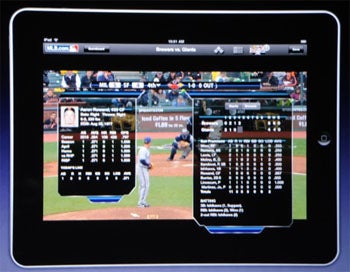
As for how you control the thing, it's gesture-driven, just like the iPhone, so think "super-sized" mobile and you've got the essence of what Apple's up to from a gaming angle. In fact the iPad can download and run nearly any iPhone app out of the box. Apple demonstrated an iPhone racing game running at a 1-to-1 pixel ratio center-screen (about a quarter active space, the rest framed by black) then showed how the iPad could interpolate the pixels to run at about two-thirds screen size. It looked a little blurry, and harked back to what console gamers were doing a generation ago, but I'm convinced Apple's not courting the high end at this point.

How does it handle in games? As noted, it's basically a giant iPhone, so you're using gestures or tapping on hot points to execute actions. Imagine swishing your fingers across the screen to fling a grenade, or using three fingers on screen at once to open a door. (Apple's apparently familiar with sci-fi author Orson Scott Card, since they're describing more or less how the school tablets work in Card's Hugo and Nebula winner, Ender's Game.)

The screen sounds like the sweetest aspect, an in-plane switching 9.7-inch LED, which makes for a brighter, better display, but uses more power than a standard TFT setup. Form over function? Maybe. It wouldn't be the first time Apple swapped substance for style.

The bottom line? If you're a casual gamer, say someone who fiddles with stuff on your iPhone between meetings (or during them) or on planes or in line waiting for movie tickets, think of this as a kind of middle-ground between your phone and your laptop. You want to play slightly more sophisticated games on a multiple-use computing device and don't mind using a gesture-driven, non-deterministic interface to do so? Here's your new toy.

The rest of you? Wait for someone to bring the killer apps, because at least from a gaming angle, what Apple demonstrated at today's show was just an evolutionary extension of its i-brand family.

Little Glance At iPad

The iPad underwhelms in terms of hardware and software, but there’s a lot of potential for innovative content. 

Hardware: Awkward to handle
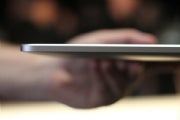
Apple iPadWhile the iPad is super slim at only a half-inch thick, I had some difficulty handling it. At 1.5 pounds, it is too heavy to hold in one hand, which is troublesome if you plan on using it as an e-reader. Other e-readers, like Amazon's Kindle 2 or the COOL-ER e-reader, are much lighter in hand and therefore make for a much more comfortable user experience. Using two hands is much more comfortable, but if you're reading a long novel, that could get quite tiresome.
Compared side-by-side, the iPad's 9.7-inch 1024-by-768-pixel LED-backlit display appeared dimmer than my iPhone 3G's (auto-brightness disabled, brightness set to maximum). Whites, in particular, looked much brighter on my iPhone. Apple had no comment, however, when I inquired about the difference. Although, one Apple spokesperson pointed out that a phone--which we expect to use outdoors as easily as indoors--might need to be brighter.

iPad OS: A giant iPhone interface

One of the biggest rumors leading up to the event was that iPhone OS 4.0 would be released in conjunction with the iPad. Instead, the iPad is running iPhone OS 3.2 (which has not been released for actual iPhones yet).
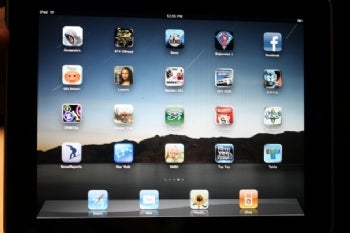
Apple iPad interfaceThe lack of a fresh, new interface for the iPad is disappointing. There might be some incremental differences between versions 3.1 and 3.2, but to me on the surface, the iPad's interface looked exactly like a blown-up version of my iPhone 3GS'. And in my opinion, the OS doesn't translate very well from the much smaller iPhone 3G to the iPad. It's not so much about the touch aspect of the interface; in fact, navigating by touch is a huge benefit on this roomy screen, superior to, say, the joystick-based navigation of the comparably sized, non-touch Amazon Kindle DX screen. But images, icons, and text aren't as crisp as expected on the higher-resolution iPad. I found it much like watching standard definition video on an HDTV; Apple doesn't seem to have optimized the operating system's visuals for the iPad's display.
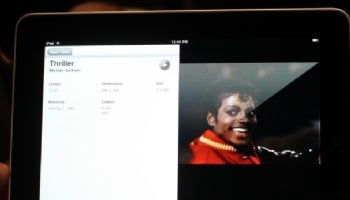
Apple iPad videoBecause of the larger display, pretty much all of the native applications we're used to viewing on the iPhone look and function better on the iPad. Video playback, in particular, is stunning on the iPad, but we're disappointed by the lack of Flash support (though that exclusion wasn't exactly surprising, it remains a grievous omission).
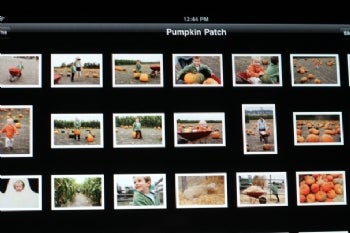
Apple iPad picture viewerAs a photo viewer, the iPad shines. Photos looked superb on the iPad's display, and it uses all of the familiar multitouch gestures (flick, pinch to zoom) found on the iPhone's photo app. The iPad's photo application is much better than the iPhone's, too, with on-the-fly slideshow creation (complete with transitions) and different ways of viewing the images (including sorting by places, people, events, and a mini-thumbnail bar at the bottom of the screen to jump quickly to other photos in the album). Unfortunately, the sorting capabilities will only work if you're using iPhoto--which means that those of who use any number of alternative imaging applications for the PC or the Mac (the majority of potential iPad users) are left in the dark with regard to those features.

Touch keyboard disappoints 
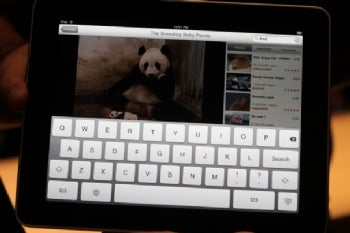
Apple iPad touch keyboardLike the rest of the OS, the touch keyboard is a larger version of the iPhone's. But unlike on the iPhone, the keyboard has no letter magnification when you press a key, and I found I missed this visual cue immensely. And unsurprisingly, it lacks haptic feedback (part of Android phones). You get no physical or visual feedback when you press a key and that's frustrating if you're trying to pound out a long e-mail. The experience, oddly, is akin to typing on the native Android OS' touch keyboard.

Using the keyboard in vertical mode, my small hands had difficulty maneuvering around the keyboard--my thumbs couldn't stretch across the whole device to reach the keys. Horizontal mode felt much more natural, but as a touch-typist, I still made more errors than I would with a physical keyboard.
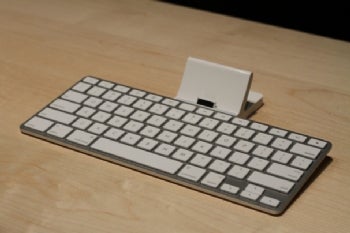
Apple iPad keyboard dockApple will be offering a keyboard dock accessory, which gives you an actual physical keyboard to work with ($69). You can also place it in the iPad Case ($39), which allows you to angle it slightly. This feels much more comfortable than just laying the tablet flat and typing. Both of these items are sold separately, though.


iPhone apps don't fly on iPad
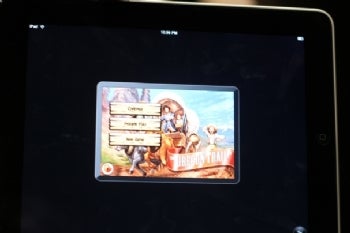
Apple iPad gameOne of the big concerns among developers and users before the iPad's announcement was whether iPhone apps would work on the device. Thankfully, they do, but the experience isn't exactly ideal. You can either view an iPhone app as a small window or doubled to fill the display. I demoed the Assassin's Creed and Oregon Trail apps, and was put off by the obvious pixelation. Text in Facebook looked fuzzy, too.
Clearly, this an interim fix until actual apps are developed for the iPad. And I expect many app makers will create versions optimized for iPad. I see a lot of gaming potential for the iPad, but cool 3D graphics game like Assassins Creed just doesn't work on the iPad.
Luckily, the iPad isn't shipping for another 60 days, so hopefully more content will be developed by then. And who knows? Some of the issues I've noticed on this demo unit may be fixed by then.