HOME

Tuesday, December 18, 2012

Apple loses bid for permanent ban on Samsung phones in U.S.


A U.S. District Court judge denied Apple's bid to ban a number of Samsung's devices from sale in the U.S., a little more than a week after a hearing on the matter.
In a late ruling Monday, Judge Lucy Koh -- who presided over the entire trial between the two tech giants -- denied Apple's bid for a sales ban on 26 Samsung products, saying that any infringing features were just part of a larger feature set, thus making a sales ban too broad.
"The phones at issue in this case contain a broad range of features, only a small fraction of which are covered by Apple's patents," Koh wrote. "Though Apple does have some interest in retaining certain features as exclusive to Apple, it does not follow that entire products must be forever banned from the market because they incorporate, among their myriad features, a few narrow protected functions."
Apple declined to comment on the ruling, and Samsung did not immediately respond to a request for comment.

Monday, December 17, 2012

Twitter rolls out option to download tweet archive

Some users on the microblogging site report having been given the option to request and download their entire tweet history.

Twitter has apparently begun rolling out a promised feature that allows users to download their entire archive of tweets.
Twitter users began tweeting last night about the appearance on a new settings feature that allows users to "Request your archive." A brief note under the new button informs users that "you can request a file containing your information, starting with your first tweet. A link will be emailed to you when the file is ready for download."

Saturday, December 15, 2012

Why Microsoft redesigned Windows


Windows 8 has its fans and foes, but Microsoft felt the time was ripe for a new look and feel for a product used by more than 1.2 billion people.
Julie Larson-Green, the new head of Windows product development, recently spoke with MIT Technology Review about the reasons behind the major changes in the latest version of Windows.
Touting the new Windows 8 Start screen, Larson-Green said that in the past Windows users worked at a desktop with a monitor. In her view, people typically launched one window, put it away, and then launched another window. But in Windows 8, all the apps and windows you might want to launch are visible through Live Tiles.
"Instead of having to find many little rocks to look underneath, you see a kind of dashboard of everything that's going on and everything you care about all at once," Larson-Green said. "It puts you closer to what you're trying to get done."
It's no secret that Windows 8 is designed with touch screens in mind. Larson-Green sees that as simply a "natural way to interact." After using a touch-screen device, even people still using the mouse and keyboard on a regular desktop may find themselves reaching out to the screen to try to move something with their finger.
And touch screens are the future, in her opinion. Though she concedes that there will always be some PCs without touch screens, she believes the majority will be touch-enabled.

Friday, December 14, 2012

One OS, three installation options: What's the best way to install Windows 8?


Ahh, Windows 8. If you’ve decided you're ready to plunk down your hard-earned cash to give this modern UI a shot, you'll want to spend a few minutes considering just how you take your first steps into the Windows 8 experience.
You have three ways to install Windows 8 after you’ve purchased it: (a) Run it as a virtual machine on your current operating system; (b) dual-boot it alongside your current operating system; or (c) perform a full install and overwrite the OS you're currently rolling with. While the installation methods vary in complexity, all three are within the grasp of even Windows novices, and each brings its own pros and cons to the table.
Let's take a deeper look at each option.

Firefox gets an all-new private browsing mode


It was just a few weeks ago that Firefox got a fresh security boost on the eve of its eighth birthday, but this week Mozilla gave users of its popular browser a better way to protect their privacy as well.


“One of the most often-requested features in the private browsing support for Firefox has been the ability to open a private window without closing the entire session,” wrote Firefox product manager Asa Dotzler in a Tuesday post  on the Future of Firefox blog.
“Over the past 19 months, we have been working on a plan to rewrite the private browsing code to do just that,” Dotzler added. “I’m happy to announce that the first experimental builds will soon be landing on the Firefox Nightly channel.”
'A huge project'
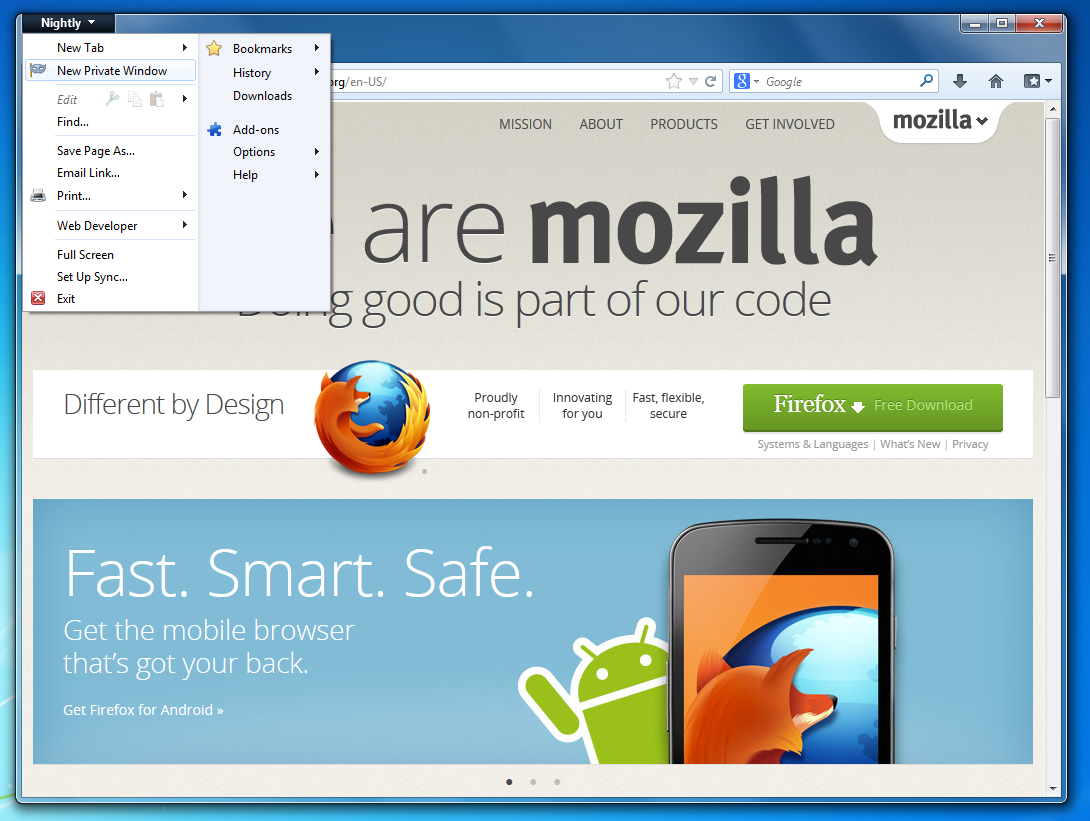
Essentially, the new feature allows Firefox users to keep their existing window open when they launch a new private window. Previously, users have had to exit the browser altogether and restart it in private mode.
MOZILLA
Firefox 20 will let users keep their existing Firefox windows when they open a new private window (Click image to enlarge).
Not only that, but “we have also added a frequently requested feature to allow opening a link in a private window,” Dotzler explained. “In order to do this, just right click on any link and choose Open Link in a New Private Window.”
To make those changes possible, Mozilla has redesigned the existing private browsing mode from scratch in what was “a huge project,” he noted.
Beta testing in February
It's Firefox 20 that's currently making its way through the Nightly channel; according to Mozilla's planned schedule, that version will enter the Aurora channel in early January and the Beta channel on Feb. 19. A final release is planned for early April 2013.

Thursday, December 13, 2012

Google Maps returns to iOS as an app after Apple's removal


Once banished from Apple's iOS, Google Maps has returned to the mobile platform in the form of a standalone app.
The official Google Maps app returned to Apple's App store this evening. As expected, the new free app includes turn-by-turn navigation, just like its Android counterpart, as well as public transit directions, integrated Street View, and a 3D-like Google Earth view.
However, as quickly as it showed up, the app has apparently vanished from the App Store. Many iOS users complained about not being able to complete the purchase, getting a message that "the item you tried to buy is no longer available." (9:05 p.m. PT update -- It's back in the store.)

Wednesday, December 12, 2012

Twitter takes on Instagram with new photo filters

Twitter unveiled its much talked-about photo filters today, giving users of its iOS and Androidapps a way to edit their pictures and share them directly from their smartphones.


The move, which comes just days after Facebook-owned Instagram blocked its photos from being displayed properly inside the Twitter timeline, sets up a new rivalry between two social networks eager to capture as many of their users' photos as possible.
The new features are available in updated versions of the iOS and Android apps. The big changes, taken from Twitter's blog post on the subject:
  • Filters. Apply one of eight filters, ranging from black & white to vintage, to add a new look and feel to your photos.
  • Take a bird's-eye view. See how each filter would affect your photo in a single grid view, or swipe through looks to compare your options. 
  • Frame the action. Crop and pinch to zoom in order to focus attention. 
  • Auto-enhance. Make your photos pop with balanced light and colors by tapping the wand
Twitter's new photo filters.
(Credit: Twitter)